If you are searching on how to unsubscribe from ChatGPT, you are one of thousands of individuals who seek a way to manage their ChatGPT Plus subscriptions, whether it be saving money, using other tools, or ending any renewal periods.
ChatGPT is one of the most advanced AI tools ever created and is used by millions of people around the globe for various tasks such as writing, programming, marketing, conducting research, and more. Nevertheless, according to industry statistics, a large number of subscribers temporarily subscribe to ChatGPT for a project but end up downgrading at some point.
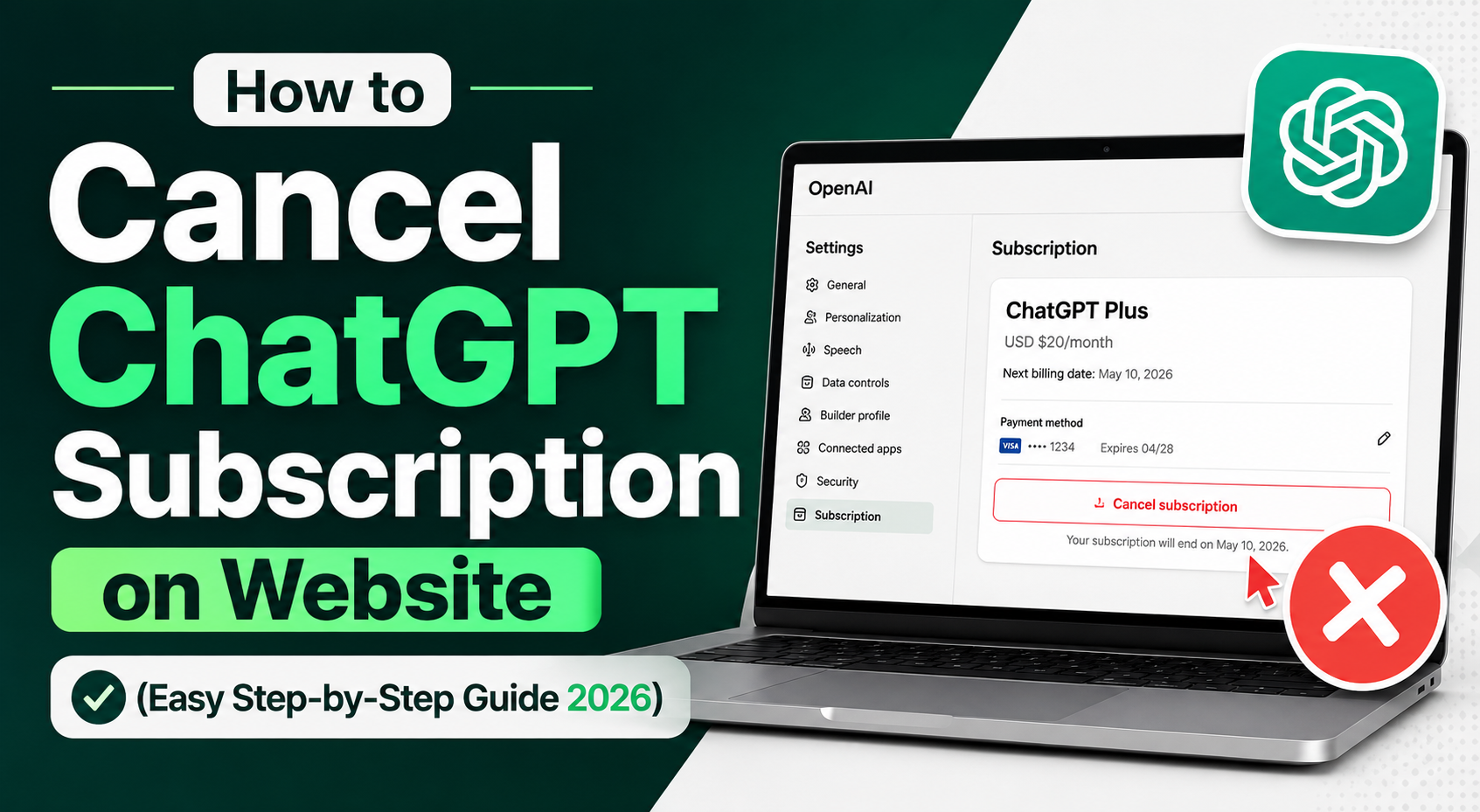
Luckily for you, unsubscribing from ChatGPT Plus is easy and can be accomplished in a matter of minutes through the OpenAI website.
Understanding ChatGPT Subscription Plans
ChatGPT Free vs ChatGPT Plus
ChatGPT Free:
Base ChatGPT services
Normal response speed
Restricted availability during high traffic periods
ChatGPT Plus:
Fast response speed
Priority access during high traffic times
Access to advanced AI models
Professional application suitability
Reasons:
Why People Unsubscribe from ChatGPT
Many people look up on websites the procedure for unsubscribing from ChatGPT for the following reasons:
- Cost saving
- Less need for premium services
- Switch to other AI services
- Use of subscription for limited project period
- Sufficient free services
Key Points to Consider Before Cancellation of ChatGPT Subscription
When considering cancellation of ChatGPT subscription, consider the following key points:
- Active status until end of billing period
- Loss of access does not happen immediately
- Chat history will be kept safe
- Automatic renewal gets canceled
- Refunds may not be available in most cases
How to Cancel ChatGPT Subscription via Website – Step by Step Guide
Step 1: Sign In To Your Account
Go to the ChatGPT website and sign into your account using your email.
Step 2: Open the Settings Tab
Go to your account settings using the profile icon.
Step 3: Go to Billing Section
Go to Billing > Manage Subscription.
Step 4: Cancel Subscription
Click on the option to cancel ChatGPT Plus subscription.
Step 5: Complete the Process
Confirm your selection and finalize the procedure.
Step 6: Receive Confirmation Email
Keep your confirmation email regarding cancellation.
What Happens After ChatGPT Plus Cancellation?
Once ChatGPT Plus is cancelled:
- Access to Premium features will remain active until payment expires.
- The user account will be downgraded to the Free account.
- All chat history will be accessible.
- ChatGPT subscription can be renewed at any moment.
Problems During Subscription Cancellation
Unable to find cancel button
- Incorrect account
- Payment made from the mobile application
Can’t load Billing Page
- Clear cache
- Change browser
Subscribed but still showing active
- Cancellation will occur by the next billing cycle.
ChatGPT Subscription Money Back Guarantee
Conditions that determine refund eligibility are:
- Method of payment
- Country of residence
How to Prevent Unnecessary Costs
- Cancel automatic renewal before deadline
- Track billing date
- Use reminders
- Downgrade rather than cancelling subscription
ChatGPT Plus FAQs
1. How can I cancel a ChatGPT Plus subscription on a website?
Settings > Billing > Manage subscription > Cancel Subscription.
2. Do I instantly lose ChatGPT Plus access after cancellation?
Not really, as your ChatGPT access won’t expire until your current billing period ends.
3. Do I have to delete my ChatGPT account after cancellation?
No, all data will stay untouched after you cancel the subscription.
4. Am I able to use ChatGPT after cancelling Plus?
Yes, you’ll return to the Free plan after ChatGPT Plus ends.
5. Can I subscribe to ChatGPT Plus again?
Certainly, as long as you are a paying customer of ChatGPT Plus.
6. Can I receive a refund after cancelling ChatGPT Plus?
Not always. Check refund details in OpenAI’s billing policies.
7. Why can’t I see the cancel subscription button?
You might be using an outdated web application or purchased the Plus plan via a
third-party app store.
8. Is ChatGPT Plus worth it in 2026?
This highly depends on individual user needs; professionals will definitely appreciate its
additional benefits.
Conclusion
Canceling your ChatGPT subscription on the website is a simple process when you follow the correct steps. By accessing your account settings and managing your subscription preferences, you can stop future renewals without hassle. Always verify your billing status after cancellation to ensure the change has been successfully applied. We hope this guide has helped you understand how to cancel your ChatGPT subscription in 2026 quickly and easily. For more technology tutorials, AI guides, and practical how-to articles, keep visiting Techxenly for the latest updates and expert insights.